Sass is the default CSS preprocessor in Rails3.1 and it is tied into the asset pipeline machinery that first appears in 3.1.
I am migrating a complex app from 3.0 to 3.1 and I want to use Sass in the 3.0 production version before I make the big jump to 3.1. So far I have been using Less and the more plugin.
I recently wrote up my experience moving from Less to Sass syntax but here I want to cover the Rails side of things.
Here are the steps involved in my Less to Sass transition in Rails 3.0.5
Part 1: Remove all traces of Less
1: Remove the less gem from your Gemfile
2: Rename the app/stylesheets folder to something else
3: Move or delete the Less plugin in vendor/plugins/more so that the app doesn't see it on start up
Part 2: Set up Sass
4: Add the sass gem to your Gemfile ( gem 'sass' )
5: Run 'bundle install'
6: Create a sass directory under public/stylesheets
7: Leave any straight css file in public/stylesheets
8: Place any SCSS files in the sass directory - these could be new files or converted Less files - give them the .scss suffix
9: Remove or rename any matching css files in the parent directory
10: Restart your server and browse to your site
All being well Sass has worked in the background, created new versions of the CSS files and put them in public/stylesheets. Look for those files and test out the operation by, say, changing a background color in the SCSS file, saving the file and reloading the page. You should see the change implemented.
There are various options that you can set in your environment.rb file or similar. But you don't need any of these. Likewise you don't need to run any rake tasks or explicitly setup sass to watch certain files. It just works.
With this set up you can now get comfortable with Sass such that moving to 3.1 and the Asset Pipeline should be straightforward.
Friday, July 6, 2012


Thursday, July 5, 2012
Histograms in Mac OS X Numbers
I am always creating histograms based on CSV files where the first column is the category and the second is the value - like this:
I want to load this into Excel or Numbers and create a bar chart where each bar is labeled with the year on the X axis and the height of the bar is the value for that category.
Load in the CSV file and you will have two columns of data.
The trick with Numbers is to specify the first column (year) as a Header column.
Go to the first column header (A) and use the pull down menu to select 'Convert to Header Column'. That makes the background for these cells gray and makes the text bold.
Now go to the first row header (1) and use that pull down to select 'Convert to Header Row'.

Select the entire table by clicking the corner cell at the top left, then go to 'Charts' icon in the toolbar and select your preferred type of bar chart. You will see the chart appear with the Years as the X axis and the column header(s) as the data series labels.
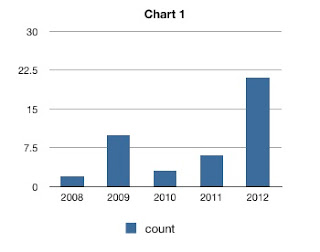
If you type data directly into a new Numbers sheet then the headers will be set up automatically, but that does not happen when you import a CSV file.
year,count
2008,2
2009,10
2010,3
2011,6
2012,21
I want to load this into Excel or Numbers and create a bar chart where each bar is labeled with the year on the X axis and the height of the bar is the value for that category.
Load in the CSV file and you will have two columns of data.
The trick with Numbers is to specify the first column (year) as a Header column.
Go to the first column header (A) and use the pull down menu to select 'Convert to Header Column'. That makes the background for these cells gray and makes the text bold.
Now go to the first row header (1) and use that pull down to select 'Convert to Header Row'.
Select the entire table by clicking the corner cell at the top left, then go to 'Charts' icon in the toolbar and select your preferred type of bar chart. You will see the chart appear with the Years as the X axis and the column header(s) as the data series labels.

If you type data directly into a new Numbers sheet then the headers will be set up automatically, but that does not happen when you import a CSV file.
Wednesday, July 4, 2012
Rails 3 YAML parse error and RedCloth
I moved a Rails 3.0.5 application to a new server with ruby 1.9.2, under rbenv. It had been working fine before but now I got this:
$ rails server
/Users/jones/.rbenv/versions/1.9.2-p290/lib/ruby/1.9.1/psych.rb:148:in `parse': couldn't parse YAML at line 183 column 9 (Psych::SyntaxError)
from /Users/jones/.rbenv/versions/1.9.2-p290/lib/ruby/1.9.1/psych.rb:148:in `parse_stream'
from /Users/jones/.rbenv/versions/1.9.2-p290/lib/ruby/1.9.1/psych.rb:119:in `parse'
from /Users/jones/.rbenv/versions/1.9.2-p290/lib/ruby/1.9.1/psych.rb:106:in `load'
from /Users/jones/.rbenv/versions/1.9.2-p290/lib/ruby/gems/1.9.1/gems/RedCloth-4.2.2/lib/redcloth/formatters/latex.rb:6:in `<module:LATEX>'
from /Users/jones/.rbenv/versions/1.9.2-p290/lib/ruby/gems/1.9.1/gems/RedCloth-4.2.2/lib/redcloth/formatters/latex.rb:3:in `<top (required)>'
[...]
There are a lot of posts about this error on the web. Some recommend specifying the 'syck' Yaml engine in the boot.rb file or messing with your libyaml setup. This did not work for me.
The solution turned out to be simple. You can see from the error message that the error is coming from the RedCloth gem. Previously I had been using version 4.2.2 (look in Gemfile.lock) even though I had not explicitly set that version.
On the new system I had version 4.2.9 installed. When I set this explicitly in the Gemfile I could start up the server just fine, after running 'bundle install'.
gem 'RedCloth', '>= 4.2.9'
Thursday, June 14, 2012
logit - selective logging of commands from a Bash shell
I spend a lot of time running custom scripts on datasets in a unix bash shell - typically I'm running various tools on DNA and protein sequence datasets. I need to try different tools, edit files and change parameters.
I wanted a way to capture those commands that worked and ignore all the others that simply listed directories, ran the editor, etc. Cutting and pasting from the shell history was really inefficient and the output of script was too voluminous.
To solve this I have written logit - a tool that lets you selective log commands and comments to a file while you work in a shell.
logit consists of a Ruby script and an associated bash shell script. When you run 'logit start' it creates a custom bash sub shell that you do your work in.
You can log comments to the log file with:
$ logit 'here is a comment'
And you log the last command you ran with just:
$ logit
There are other options to help you log commands further back in your history.
The resulting log file contains only those commands and comments that you chose to log. As such it serves as a concise record of a work session and may form the basis for an executable script in itself.
The regular Bash history mechanism is does not allow you to record lines from your history in a files. I'm not clear why but the cleanest solution I could come up with was the pairing of a Ruby and a Bash script. In practice you only ever deal with the Ruby script.
The code is distributed freely under the MIT license and can be found on Github at https://github.com/craic/logit
I wanted a way to capture those commands that worked and ignore all the others that simply listed directories, ran the editor, etc. Cutting and pasting from the shell history was really inefficient and the output of script was too voluminous.
To solve this I have written logit - a tool that lets you selective log commands and comments to a file while you work in a shell.
logit consists of a Ruby script and an associated bash shell script. When you run 'logit start' it creates a custom bash sub shell that you do your work in.
You can log comments to the log file with:
$ logit 'here is a comment'
And you log the last command you ran with just:
$ logit
There are other options to help you log commands further back in your history.
The resulting log file contains only those commands and comments that you chose to log. As such it serves as a concise record of a work session and may form the basis for an executable script in itself.
The regular Bash history mechanism is does not allow you to record lines from your history in a files. I'm not clear why but the cleanest solution I could come up with was the pairing of a Ruby and a Bash script. In practice you only ever deal with the Ruby script.
The code is distributed freely under the MIT license and can be found on Github at https://github.com/craic/logit
Tuesday, June 12, 2012
CSS and Rails - Migrating from Less to Sass
In my Rails projects over the past couple of years I have been using Less to make my CSS files easier to work with. Less is a CSS pre-processor that lets you use variables for color, etc.
Less is pretty similar to Sass and I didn't see any real reason to move away from it. But then Rails 3.1 made the decision to uses Sass and CoffeeScript as CSS and JavaScript preprocessors. So now I want to migrate my Less files over to Scss (the v2 format of Sass) so I can go with the flow in current Rails versions.
Sass comes with a conversion tool called sass-convert that you can find in the bin directory of the gem.
You can find where that is located with 'gem which sass'. But this gave me this error:
NameError: undefined method `build' for module `Less::StyleSheet::Mixin4'
From the sass github site it seems like sass -convert has not kept up with changes in Less and there seems little motivation to fix the problem.
Never mind - the Less and Scss syntaxes are pretty similar and my files do not include anything too complex, so manually converting them in an editor is quite feasible. In fact the main difference is that Less prefixes variables with @ and Sass uses $. The important exception here is that @import should not be changed as it is exactly the same in Sass.
Less has an equivalent to Sass Mixins. You create a custom class and then insert that into other CSS blocks. Here is an example followed by the Sass equivalent.
.my-mixin {
color: red;
}
.my-class {
width: 200px;
.my-mixin;
}
In Sass you would write:
@mixin my-mixin {
color: red;
}
.my-class {
width: 200px;
@include my-mixin;
}
Making this conversion is easy enough to do with find and replace in your editor.
The easiest way to validate the modified files is to run sass on them and check the css.
$ sass my.scss my.css
You can try validating the CSS using a service like http://jigsaw.w3.org/css-validator/validator
Less is pretty similar to Sass and I didn't see any real reason to move away from it. But then Rails 3.1 made the decision to uses Sass and CoffeeScript as CSS and JavaScript preprocessors. So now I want to migrate my Less files over to Scss (the v2 format of Sass) so I can go with the flow in current Rails versions.
Sass comes with a conversion tool called sass-convert that you can find in the bin directory of the gem.
You can find where that is located with 'gem which sass'. But this gave me this error:
NameError: undefined method `build' for module `Less::StyleSheet::Mixin4'
From the sass github site it seems like sass -convert has not kept up with changes in Less and there seems little motivation to fix the problem.
Never mind - the Less and Scss syntaxes are pretty similar and my files do not include anything too complex, so manually converting them in an editor is quite feasible. In fact the main difference is that Less prefixes variables with @ and Sass uses $. The important exception here is that @import should not be changed as it is exactly the same in Sass.
Less has an equivalent to Sass Mixins. You create a custom class and then insert that into other CSS blocks. Here is an example followed by the Sass equivalent.
.my-mixin {
color: red;
}
.my-class {
width: 200px;
.my-mixin;
}
In Sass you would write:
@mixin my-mixin {
color: red;
}
.my-class {
width: 200px;
@include my-mixin;
}
Making this conversion is easy enough to do with find and replace in your editor.
The easiest way to validate the modified files is to run sass on them and check the css.
$ sass my.scss my.css
You can try validating the CSS using a service like http://jigsaw.w3.org/css-validator/validator
Thursday, June 7, 2012
Setting a Title for a Tab in iTerm2 on Mac OS X
iTerm2 (http://www.iterm2.com) by George Nachman is an excellent terminal emulator for Mac OS X that is highly configurable. I it prefer over the system Terminal application.
I tend to have a number of terminal sessions open at the same time and for a while I have wanted a way to give each Tab in the window an informative name. You can do that through the iTerm2 preferences but I wanted a way to set it directly from the shell command line.
iTerm2 can be scripted via AppleScript and so I wrote a simple script to do the job. It uses a system application called osascript which will execute a AppleScript script from the Unix command line.
The code is freely available at https://github.com/craic/iterm_title - see the README for more details.
The code should be a useful starting point if you want to write something in AppleScript that you can call from UNIX.
I tend to have a number of terminal sessions open at the same time and for a while I have wanted a way to give each Tab in the window an informative name. You can do that through the iTerm2 preferences but I wanted a way to set it directly from the shell command line.
iTerm2 can be scripted via AppleScript and so I wrote a simple script to do the job. It uses a system application called osascript which will execute a AppleScript script from the Unix command line.
The code is freely available at https://github.com/craic/iterm_title - see the README for more details.
The code should be a useful starting point if you want to write something in AppleScript that you can call from UNIX.
Wednesday, May 30, 2012
rbenv - quick start
rbenv is a way to handle multiple versions of Ruby on a single machine and is an alternative to rvm.
I have been using rvm for some time and it works fine, but rbenv seems to have a slight edge in terms of simplicity and, perhaps, transparency in the way it handles version specific gems.
I installed it on a new machine with Mac OS X Lion using homebrew
Not surprisingly, Jruby required that Java be installed but it was smart enough to trigger the download automatically.
You need to add two lines to your .bashrc, .bash_profile or whatever config file is appropriate for your preferred shell. Then create a new shell to pick up the definitions.
The documentation is pretty straightforward in terms of setting different versions of Ruby in different projects.
Things get a bit confusing when it comes time to set up gems. rvm places copies of each gem in directories that are linked to each ruby version. By and large, rbenv doesn't mess with them.
With rbenv you install specific gems into a single system wide directory, as you would with a single Ruby version. For a given project you specify the required gems in a Gemfile in the project directory and you run
to make sure that you have correct versions of all the gems for that given project.
If you have installed a specific gem but find that it does not work or does not appear to exist then run this to, hopefully, fix the issue.
I have been using rvm for some time and it works fine, but rbenv seems to have a slight edge in terms of simplicity and, perhaps, transparency in the way it handles version specific gems.
I installed it on a new machine with Mac OS X Lion using homebrew
$ brew update
$ brew install rbenv
$ brew install ruby-build
You can see which versions of ruby are available using
$ rbenv versions
You can install them like this
$ rbenv install 1.9.3-p0
$ rbenv install 1.8.7-p302
$ rbenv install jruby-1.6.7You need to add two lines to your .bashrc, .bash_profile or whatever config file is appropriate for your preferred shell. Then create a new shell to pick up the definitions.
export PATH="$HOME/.rbenv/bin:$PATH"

eval "$(rbenv init -)"
Things get a bit confusing when it comes time to set up gems. rvm places copies of each gem in directories that are linked to each ruby version. By and large, rbenv doesn't mess with them.
With rbenv you install specific gems into a single system wide directory, as you would with a single Ruby version. For a given project you specify the required gems in a Gemfile in the project directory and you run
$ bundle execto make sure that you have correct versions of all the gems for that given project.
If you have installed a specific gem but find that it does not work or does not appear to exist then run this to, hopefully, fix the issue.
$ rbenv rehash
Subscribe to:
Posts (Atom)
Subscribe To This Site


 Posts
All Comments
Posts
All Comments